RetroPlus
- Company name
- RetroPlus
- Role
- Full-Stack WordPress Engineer
The challenge
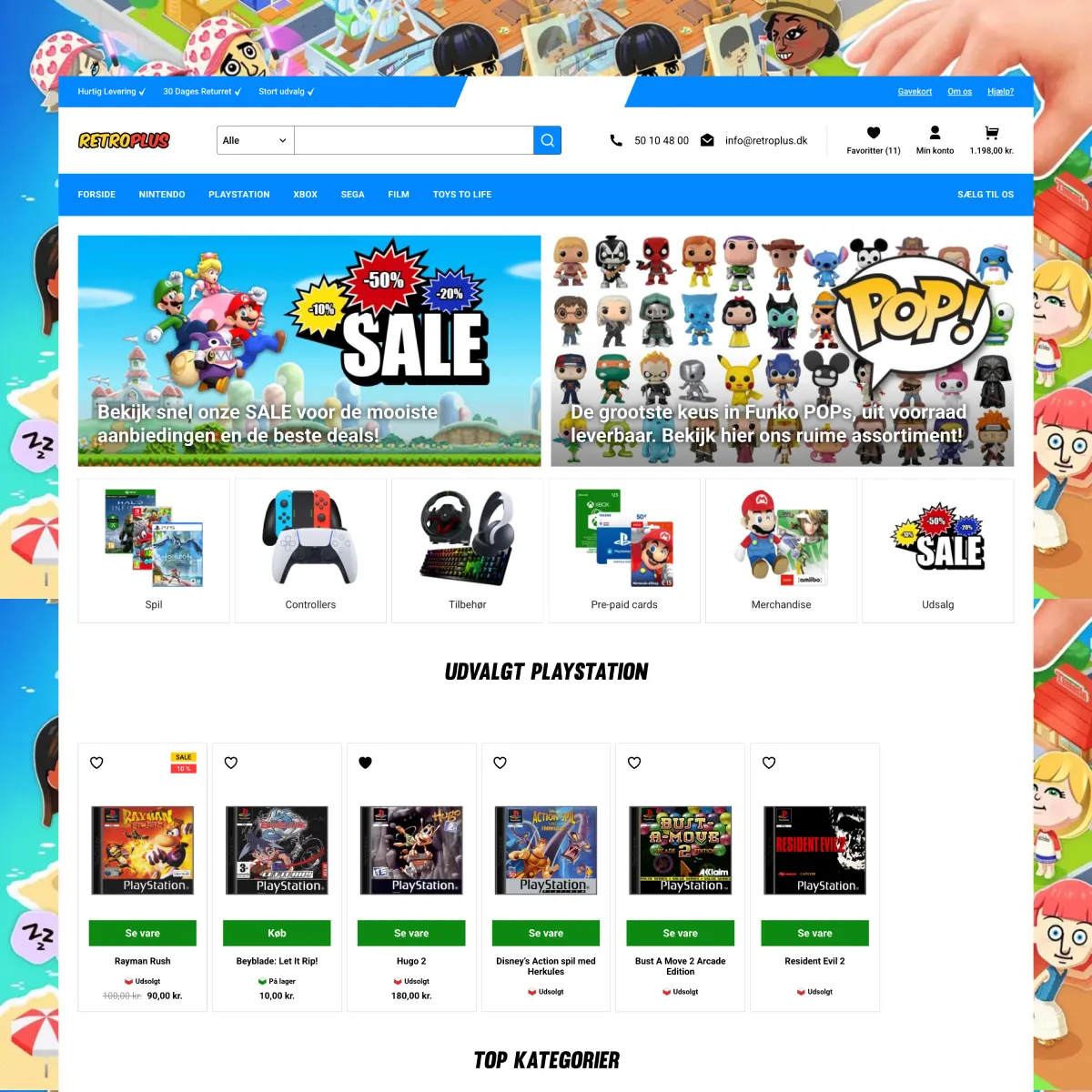
RetroPlus needed more than a standard WordPress shop. The store required custom-built features to deliver a fast, modern shopping experience while giving the owner full control over every part of the site.
- Clean product URLs
- WooCommerce generates messy URLs by default. The store needed clean, readable links across 40+ gaming platforms without breaking existing URLs or search rankings.
- Instant product search
- Customers needed a fast search bar that shows results as they type, with product images and prices, without slowing down the rest of the site.
- Wishlist for everyone
- A save-for-later feature that works whether the customer has an account or not, and keeps their saved items when they sign up.
- Danish checkout flow
- Denmark has specific checkout needs like business vs. private customers, public institution billing with EAN numbers, and pickup point (pakkeshop) selection for shipping.
- Product filters
- Category pages with hundreds of products needed filters so customers can narrow down by things like model, controller type, or price range, all without reloading the page.
- Cart rewards
- A progress bar on the cart page that shows customers how close they are to unlocking free shipping or a discount, and applies the discount automatically.
- Custom editor blocks
- 7 drag-and-drop blocks for the WordPress editor so the store owner can manage product carousels, menus, banners, FAQs, and newsletter signups without touching code.
- Fast page loads
- Despite all the custom features, the site needed to stay fast. CSS and JavaScript only load on pages where they are actually needed.
- Gift card support
- The store sells digital gift cards that needed a custom page design and special handling so they are excluded from shipping, cart rewards, and discount coupons.
Technical implementation
RetroPlus is built on WordPress with WooCommerce, using GeneratePress as the base theme. The code is organized into three separate layers: a core plugin for things that should never be accidentally turned off (like URLs and order numbers), a features plugin for everything else (search, wishlist, filters, blocks), and a child theme that only handles the visual design.
Here is what I built on top of that foundation.
Clean product URLs
By default, WooCommerce gives products URLs like /product/god-of-war/ and categories look like /product-category/playstation/playstation-4/spil/. These are ugly and not great for search engines. I replaced them with clean, logical URLs.
Now a product like God of War shows up at /playstation/playstation-4/spil/god-of-war/ and categories at /playstation/playstation-4/spil/. The URL reads like a trail that makes sense to both people and search engines.
This was one of the trickiest parts of the project. The store has 40+ gaming platforms (PlayStation 1-5, PSP, PS Vita, Nintendo Game Boy through Switch, Xbox, Sega, and more), each with sub-categories like Konsoller (consoles), Spil (games), and Tilbehør (accessories). WordPress normally creates messy URLs when multiple categories share the same name, so I built a mapping system that keeps everything clean. Old URLs automatically redirect to the new ones so no links break and search rankings are preserved.
There is also an edge case where two products could end up with the same URL. For example, a "slim" console exists for both PlayStation 3 and PlayStation 4. My system handles this gracefully. If someone tries to create a product that would cause a URL clash, it blocks the action and shows a clear error message.
Sequential order numbers
WooCommerce uses internal database IDs as order numbers, so customers end up seeing random-looking numbers like #48723. I built a system that gives each order a simple, counting number: #1, #2, #3, and so on.
Even if two orders come in at the exact same moment, the system makes sure each one still gets its own unique number. It works with WooCommerce's newer storage system (HPOS) and handles subscriptions correctly too.
These order numbers show up everywhere: in emails, on the customer's account page, in the admin panel, and on the order tracking page. Staff can also search by these numbers.
Instant product search
The store needed a search bar that shows results as you type. The existing plugin (FiboSearch) was too heavy to load on every page just for a header search bar, so I built a lightweight one from scratch.
When customers start typing, a dropdown appears instantly with matching products, their images, prices, and whether they are in stock. They can also filter by category to narrow things down to a specific platform.
- Results show up fast because they are cached on the server
- If someone types quickly, only the final search actually runs to save bandwidth
- Works with keyboard navigation (arrow keys, Enter, Escape)
- Accessible to screen readers
- Rate limited to 30 searches per minute per visitor to prevent abuse
- Clicking "See all" opens a full results page that matches the dropdown
Wishlist system
Customers can click a heart icon on any product to save it for later. If they are not logged in, the wishlist is stored in a secure cookie. If they have an account, it is saved there instead. When a guest signs up or logs in, their saved items automatically merge with their account so nothing is lost.
There is a dedicated wishlist page showing all saved products with images, prices, and stock info. It also suggests related products based on what the customer has saved. The page is part of the My Account section as well.
Product filters
Some categories have hundreds of products, so customers need a way to narrow things down. I built filters that let them sort by attributes like model, controller type, or price range. The products update on the page without a full reload.
The filters change depending on which category the customer is browsing. The store owner can decide which attributes show up as filters for each category through the WordPress admin. There is also a price range slider that automatically picks up the lowest and highest prices in each category.
Custom editor blocks
I built 7 custom blocks for the WordPress editor so the store owner can manage key parts of the site by dragging and dropping, without needing a developer:
- Featured Products: a swipeable product carousel. The owner picks which products or categories to show, and the block displays them with images, prices, and add-to-cart buttons.
- Desktop Menu: a large dropdown menu designed for the store's category structure.
- Mobile Menu: a separate touch-friendly menu for phones and tablets.
- Promo Banner: a banner for sales and promotions.
- FAQ Block: expandable question-and-answer sections.
- Klaviyo Newsletter: a signup form connected to the store's email marketing platform.
- Breadcrumb: navigation breadcrumbs that show where you are on the site.
Custom checkout
The default WooCommerce checkout does not handle Danish-specific needs. I rebuilt the entire checkout flow from scratch.
- Three customer types: private customers, businesses, and public institutions, each with their own set of required fields
- EAN number support for Danish public institutions that use EAN for billing
- Pickup point selection: customers enter their postal code and choose a nearby GLS pakkeshop as their delivery address, powered by the Shipmondo API
- Modal popups for adding a different delivery address (private or business)
- Floating labels that move above the input field when you start typing
- Fields arranged in the order Danish customers expect (email first, then name, address, postal code, city, phone)
- Returning customers see their previous shipping method and customer type already filled in
Cart rewards
The cart page has a progress bar with two milestones: free shipping and a percentage discount. As customers add products, the bar fills up and tells them exactly how much more they need to spend to unlock the next reward.
When they reach the discount threshold, a coupon is automatically applied to the order. The store owner can change the discount percentage and minimum spend amount from a settings page.
Product badges
The store owner can add small labels to any product, like "New", "Limited Edition", or "Best Seller". Each badge gets its own colors and shows up on product cards throughout the site.
Category icons
Each product category can have its own icon. The store owner pastes SVG icon code in the admin, and the icons appear in the search dropdown, navigation menus, and category pages. The icons are cleaned up automatically to prevent any security issues.
Product editor extensions
I added several custom tabs to the WooCommerce product editor:
- Video tab: add a YouTube or Vimeo link that shows up on the product page
- Specifications tab: a drag-and-drop list for adding specs like Storage: 500GB
- Additional Information tab: a rich text field for extra product details
- Product Condition: mark a product as Nyt (New) or Brugt (Used) in Danish
- Gift Card FAQ: an FAQ section specifically for gift card products
Gift card support
The store uses the PW Gift Cards plugin for selling gift cards, but the default look did not fit the site's design. I built a custom gift card page and added popups for entering gift card codes on the cart and checkout pages.
Since gift cards are digital, they are excluded from shipping calculations, cart rewards, and discount coupons.
Registration flow
WooCommerce's default registration only asks for an email address. I added first name and last name fields, a newsletter opt-in checkbox that connects to Klaviyo (the store's email marketing tool), and proper error messages when something goes wrong.
Blog layout
I designed a custom blog page with a large featured area for the latest post, a highlighted posts section, a card-based grid for older posts, and pagination to browse through them.
Theme and visual design
The entire look of the site is built as a child theme on top of GeneratePress:
- Custom page templates for products, cart, checkout, and account pages
- Category pages that look different depending on whether you are on a top-level platform or a sub-category
- Cart page with +/- quantity buttons, shipping estimates, VAT display, and a Shop further button
- Responsive design that works on phones, tablets, and desktops
- Custom heading font (Muro Slant)
- CSS and JavaScript files only load on pages where they are actually needed, keeping things fast